
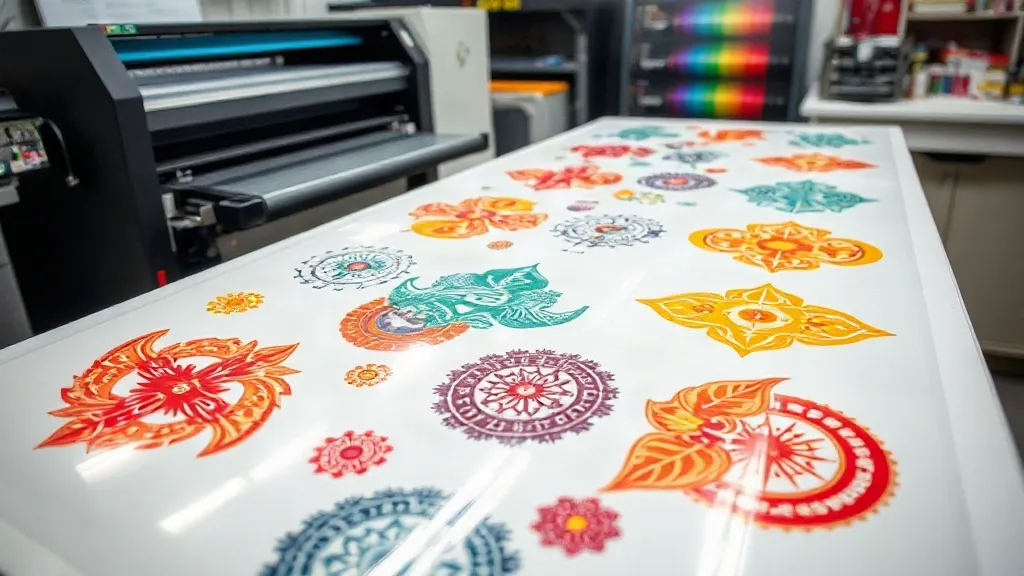
Color consistency can make or break a DTF printing business. One batch comes out vibrant and true to the design, the next looks dull or shifted. If you have ever pulled a transfer off the press and felt that sinking feeling when the colors are off, you are not alone. The good news is that many color issues can be traced back to how you prepare and use your DTF Gangsheet. In this article, we will explore the factors that affect color accuracy on a gangsheet and share practical steps to keep your prints looking sharp and consistent.
Why Color Consistency Matters in DTF Printing
Customers expect the colors they see on screen to match what comes out of the printer. When they do not, you face reprints, refunds, and damaged trust. For apparel decorators, consistent color is a hallmark of professionalism. It ensures that a team's jerseys all look the same shade of red, or that a brand's logo appears identical on every shirt in an order. With gangsheets, where multiple designs share one sheet, inconsistency becomes even more noticeable. A single sheet might contain ten different graphics, and if each one prints with slightly different color, the entire batch looks sloppy.
Understanding the DTF Gangsheet Workflow
A DTF Gangsheet is a large sheet of film on which multiple designs are printed together, then powdered and cured as one unit. This approach saves time and material, but it also introduces variables that can affect color. The way you arrange designs, the film you use, the printer settings, and the powder application all play a role in the final color output. By controlling these variables, you can achieve consistent color across the entire sheet and from one sheet to the next.
Film Selection and Storage
Not all DTF film is created equal. Cheap film may have inconsistent coating, leading to uneven ink absorption and color shifts. Always use high-quality film designed for DTF printing, and store it in a cool, dry place away from direct sunlight. Humidity can cause the film to warp or the coating to degrade, which affects how the ink sits on the surface. Before printing, inspect the film for any signs of damage or uneven texture. A quick visual check can save you from a whole sheet of wasted ink and time.
Printer Settings and Color Profiles
Your printer's color profile is the roadmap that tells it how to convert digital colors into ink. If the profile is outdated or incorrect, colors will drift. Calibrate your printer regularly and use the correct ICC profile for your specific ink and film combination. Many printers allow you to save custom settings for DTF gangsheets, so you can lock in the right parameters. Also, ensure that your design software is set to the same color mode (usually RGB) and that you are not inadvertently converting to CMYK without the proper profile. A mismatch here is a common cause of dull or shifted colors.
Ink Quality and Maintenance
Using third-party or expired ink can lead to clogs and inconsistent color. Stick with reputable ink suppliers and follow the manufacturer's recommendations for maintenance. Regularly clean the printhead and perform nozzle checks to catch issues early. Even a single clogged nozzle can cause banding or color gaps in your prints. If you notice a problem, address it immediately before printing a large gangsheet. A little preventive maintenance goes a long way in preserving color accuracy.
Powder Application and Curing
After printing, the design is covered with adhesive powder and then cured. The amount of powder and the curing temperature can influence the final appearance of the colors. Too much powder can create a hazy, muted look, while too little may result in poor adhesion. Similarly, undercuring can leave the ink wet and prone to smudging, while overcuring can cause the colors to become brittle or discolored. Follow the powder manufacturer's guidelines for application and curing. Invest in a reliable curing oven or heat press with accurate temperature control, and use a laser thermometer to verify the actual temperature on the film.
Best Practices for Color Management on Gangsheets
To keep colors consistent across a gangsheet, adopt a systematic approach. Here are key practices to integrate into your workflow:
- Test on a small scale: Before committing to a full gangsheet, print a small test strip with the same settings to check color output.
- Group similar colors: When arranging designs, place those with similar color palettes near each other to minimize visual contrast and make color shifts less obvious.
- Use a color target: Include a small color bar or target on the edge of the gangsheet. After printing, you can measure it with a spectrophotometer to verify accuracy and adjust as needed.
- Maintain consistent environment: Temperature and humidity can affect ink behavior. Keep your print room stable and avoid drastic changes.
- Document your settings: Keep a log of printer settings, ink lot numbers, and curing parameters for each job. If a problem arises, you can trace it back and make corrections.
These habits might seem small, but they add up to significant improvements in color reliability.
Common Color Issues and How to Fix Them
Even with the best practices, problems can occur. Here are some common color issues on DTF gangsheets and their solutions:
- Faded or washed-out colors: This often indicates insufficient ink coverage or incorrect color profile. Check ink levels, clean the printhead, and verify the profile. Also, ensure the film is not expired.
- Color shifting between batches: This can result from inconsistent ink batches or environmental changes. Use the same ink lot for critical jobs and store ink properly. Calibrate the printer before each major run.
- Banding or streaks: Usually caused by clogged nozzles or uneven film coating. Run a nozzle check and clean as needed. If banding persists, try a different film roll.
- Muddy or dark colors: Over-powdering or overcuring can darken colors. Reduce powder amount and check curing temperature. Also, ensure the design file is in the correct color mode.
By recognizing these symptoms, you can quickly diagnose and correct issues before they affect the entire gangsheet.
How Gangsheet Layout Affects Color Perception
The arrangement of designs on a gangsheet can influence how colors are perceived. For example, placing a bright design next to a dark one can make the bright one appear even brighter due to simultaneous contrast. While this does not change the actual ink colors, it can affect the overall visual balance of the sheet. When possible, group designs with similar color temperatures together. Also, leave some space between designs to prevent ink from bleeding or smudging, which can alter color edges. A well-planned layout not only saves film but also contributes to a more uniform appearance.
Investing in Tools for Color Accuracy
Serious DTF printers should consider investing in a spectrophotometer or a colorimeter. These devices measure color objectively and help you maintain consistency across batches. They can also be used to create custom ICC profiles tailored to your specific printer, ink, and film. While the initial cost may seem high, the savings from reduced reprints and waste quickly add up. Additionally, a good loupe or magnifying glass can help you inspect prints for fine details and color registration.
Frequently Asked Questions
How can I ensure color consistency across multiple DTF gangsheets?
Consistency starts with standardization. Use the same printer, ink, film, and settings for every job. Calibrate your printer regularly and use a color target on each sheet to monitor output. Keep a log of your parameters and stick to a routine maintenance schedule. If you change any variable, such as a new ink batch, test and adjust accordingly.
What is the best way to store DTF film to prevent color issues?
Store film in a cool, dry place, away from direct sunlight and heat sources. Keep it in its original packaging or a sealed container to protect it from dust and moisture. Avoid stacking heavy objects on top, as this can damage the coating. Use film within the recommended shelf life, and always inspect before use.
Why do my colors look different after curing?
Curing can slightly alter colors due to the heat affecting the ink and powder. Overcuring may cause colors to darken or become brittle, while undercuring can leave them looking dull. Follow the powder and film manufacturer's curing guidelines precisely, and use a thermometer to verify temperature. If colors still shift, try adjusting the curing time or temperature in small increments.
Can I use a regular printer for DTF gangsheets?
DTF printing requires a specialized printer that uses DTF ink and can handle the film. While some modified inkjet printers can be used, they may not produce consistent results. It is best to use a printer designed for DTF or one that has been properly converted with a DTF ink system. Using the wrong equipment can lead to clogs, poor color, and frequent breakdowns.
How do I fix banding on my DTF prints?
Banding is usually caused by clogged printhead nozzles. Run a nozzle check and perform a cleaning cycle. If banding persists, try a deeper cleaning or replace the printhead if necessary. Also, check that the film is loaded correctly and that there are no wrinkles. In some cases, banding can be due to a faulty ink supply or air in the lines, so inspect the ink system as well.