
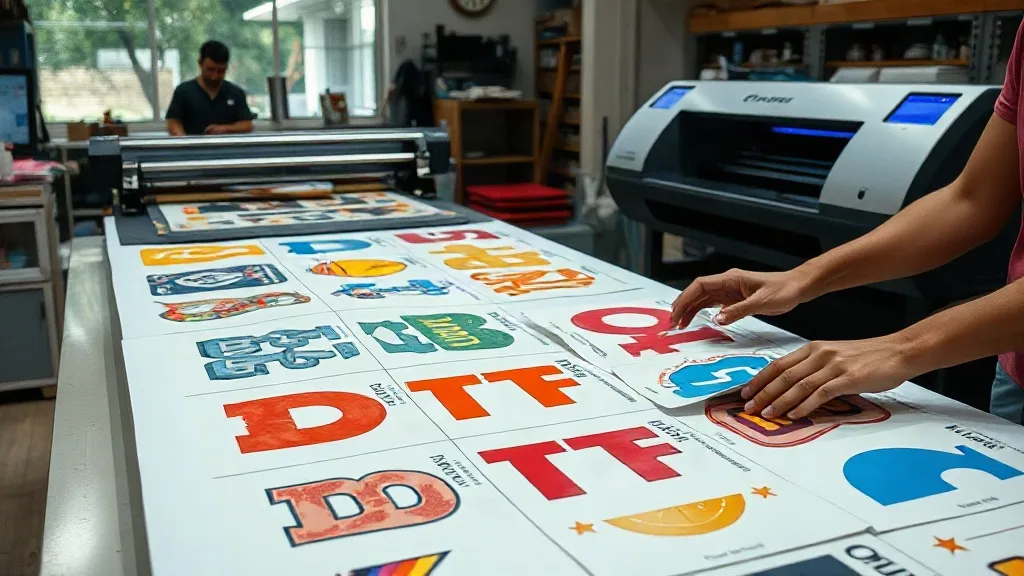
If you're in the custom apparel business, you know that time and cost are everything. Every minute spent cutting and weeding vinyl, or every inch of wasted transfer film, eats into your profit margin. That's where the DTF Gangsheet comes in. This innovative approach to direct-to-film printing lets you arrange multiple designs on a single sheet, maximizing efficiency and minimizing waste. In this article, we'll explore what a DTF gangsheet is, how it works, and why it might be the game-changer your print shop needs.
What is a DTF Gangsheet?
A DTF gangsheet is essentially a large sheet of transfer film that holds multiple designs printed simultaneously. Instead of printing each design individually, you gang them together, hence the name. This method is particularly popular in the direct-to-film (DTF) printing community because it saves both time and materials. The sheet is printed using a DTF printer, then powdered with adhesive, and cured. Once ready, you can press the designs onto garments one by one or in batches.
The beauty of a gangsheet lies in its flexibility. You can mix and match different sizes, colors, and designs on the same sheet, as long as they fit within the printable area. This is perfect for small businesses that offer personalized products or for large operations looking to streamline their workflow.
How Does DTF Printing Work?
Before diving deeper into gangsheets, let's briefly cover the DTF printing process. DTF stands for direct-to-film. Unlike DTG (direct-to-garment) printing, which prints directly onto the fabric, DTF involves printing your design onto a special film. The process goes like this:
- Design Preparation: Your artwork is prepared digitally, ensuring it's mirrored and sized correctly.
- Printing: The design is printed onto a PET film using a DTF printer with specialized inks (usually CMYK plus white).
- Powdering: While the ink is still wet, a hot-melt adhesive powder is applied evenly over the design. This powder will later bond the ink to the fabric.
- Curing: The film is heated to melt the powder, creating a durable, flexible layer.
- Pressing: The film is placed on the garment and heat-pressed, transferring the design permanently.
This process works on a wide range of fabrics, including cotton, polyester, blends, and even some nylons, making it highly versatile.
Why Use a DTF Gangsheet?
Now that you understand the basics, let's explore the benefits of using a gangsheet in your DTF printing workflow.
1. Time Efficiency
Printing multiple designs on one sheet drastically reduces setup time. Instead of loading and unloading film for each design, you print once and move on. For a print shop that handles many small orders, this can save hours each week. Imagine you have ten different t-shirt designs to print. Individually, you'd need ten separate print jobs, each with its own film, powdering, and curing steps. With a gangsheet, you arrange all ten designs on one sheet, print once, powder once, and cure once. The time savings are substantial.
2. Cost Savings
Material waste is a silent profit killer. Every time you print a single design, you use a certain amount of film, ink, and powder. With a gangsheet, you maximize the use of the film by filling empty spaces with smaller designs. This reduces waste and lowers your cost per print. Additionally, less film means less powder and ink consumed, further cutting costs. Over time, these savings add up, especially for high-volume shops.
3. Flexibility and Customization
Gangsheets allow you to combine different designs, sizes, and quantities on one sheet. This is ideal for businesses that offer personalized products or handle varied orders. For example, a sports team might need jerseys with different numbers and names. You can gang all those variations onto one sheet, print them together, and press them onto the jerseys. This flexibility is a huge advantage over traditional methods that require separate setups for each variation.
4. Consistent Quality
When you print multiple designs in one job, they all go through the same printing, powdering, and curing conditions. This consistency ensures that every design on the sheet has the same vibrant colors and durable finish. In contrast, printing designs separately might lead to slight variations due to changes in environmental conditions or printer settings. With a gangsheet, you get uniform quality across the board.
5. Scalability
As your business grows, you need processes that can scale. Gangsheets are inherently scalable: you can start with a small sheet for a few designs and move to larger sheets as demand increases. This scalability makes it easy to expand your production without overhauling your entire workflow.
How to Create a DTF Gangsheet
Creating a gangsheet requires some planning and the right tools. Here's a step-by-step guide:
- Gather Your Designs: Collect all the designs you want to print. Ensure they are high resolution (300 DPI or higher) and in the correct color mode (RGB for digital, but DTF printers often use CMYK).
- Determine Sheet Size: Decide on the dimensions of your gangsheet. Common sizes are 13x19 inches, 22x24 inches, or larger, depending on your printer's capabilities.
- Arrange Designs: Use design software (like Photoshop, Illustrator, or dedicated gangsheet builders) to arrange your designs on the sheet. Leave a small gap between designs to allow for cutting. Optimize the layout to minimize wasted space.
- Mirror the Designs: Remember to mirror (flip horizontally) each design because DTF printing transfers the image face down.
- Print and Process: Print the sheet using your DTF printer, apply powder, and cure as usual.
- Cut and Press: Cut out each design and press onto garments.
Many DTF printers come with RIP software that includes gangsheet tools, or you can use online gangsheet builders offered by some suppliers.
Tips for Optimizing Your Gangsheet
To get the most out of your gangsheets, keep these tips in mind:
- Nest Designs Efficiently: Rotate and reposition designs to fill gaps. Small items like logos can fit into odd spaces.
- Group Similar Colors: If your printer has separate channels for white and color, grouping designs with similar color profiles can reduce ink switching and improve speed.
- Leave Enough Space for Cutting: Don't place designs too close; you need room to cut them out cleanly.
- Test Your Layout: Before printing a large sheet, do a test print on a small scale to check alignment and color accuracy.
- Use Quality Film and Powder: The quality of your consumables directly affects the final output. Invest in reputable brands.
Common Applications of DTF Gangsheets
DTF gangsheets are used across various industries and applications. Here are some common ones:
- Custom T-Shirts: Print multiple shirt designs for events, teams, or retail.
- Sportswear: Add names and numbers to jerseys efficiently.
- Promotional Items: Create small logos for bags, hats, and more.
- Fashion Prototypes: Test multiple designs without committing to large runs.
- Personalized Gifts: Produce one-off items with different designs on a single sheet.
Frequently Asked Questions
What is the maximum size for a DTF gangsheet?
The maximum size depends on your printer's specifications. Common DTF printers support sheet widths up to 13 inches, 24 inches, or even 60 inches for industrial models. The length can be as long as your film roll allows, but practical limits are set by your cutting and handling capabilities. Always check your printer's manual for the maximum printable area.
Can I mix different fabric types on one gangsheet?
Yes, you can mix designs intended for different fabrics on the same gangsheet because the DTF transfer itself is applied to the garment later. However, ensure that the designs are appropriately sized and that you use the correct pressing parameters for each fabric when applying. The gangsheet is just the transfer; the fabric compatibility is determined during pressing.
How do I price items produced from a gangsheet?
Pricing should cover your materials, labor, and overhead, plus profit. Calculate the cost per design by dividing the total cost of the gangsheet (film, ink, powder, labor) by the number of designs. Then add your markup. Keep in mind that smaller designs on a gangsheet may cost less in materials, so you might adjust pricing accordingly.
Do I need special software to create a gangsheet?
You can use general design software like Adobe Photoshop or Illustrator, but dedicated gangsheet builders (often provided by DTF suppliers) make the process easier with automatic nesting and alignment tools. Some RIP software also includes gangsheet functionality. Choose the tool that fits your workflow and budget.
How long does a DTF gangsheet last before use?
When stored properly in a cool, dry place away from direct sunlight, a cured DTF gangsheet can last for several months. However, it's best to use it within a few weeks for optimal transfer quality. Always check for any signs of dust or damage before pressing.
Conclusion
DTF gangsheets are a smart, efficient way to handle multiple designs in one print job. They save time, reduce waste, and offer flexibility that traditional methods can't match. Whether you're a small startup or an established print shop, incorporating gangsheets into your workflow can lead to significant improvements in productivity and profitability. Give it a try and see the difference for yourself.